Windows 11 : show current version

Build means the kernel version of Windows. How current the Windows 10 or Windows 11 installation is, can be seen by the build number used.
Show version
By entering the command "winver" the build number can be found out:
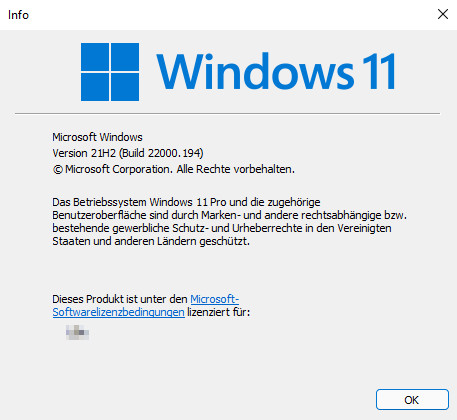
According to Microsoft's plans in 2015, Windows 10 should be the last Windows version. What was meant at that time was that Windows 10 should only be renewed via update. To everyone's surprise, Microsoft then announced Windows 11 in June 2021.
Current Windows versions
The current Windows 10 version is
Source: docs.microsoft.com/en-us/windows/release-information.
The current Windows11 version is
Source: docs.microsoft.com/en-us/windows/release-health/windows11-release-information
Windows 11 versions
| version | discovered |
|---|
Windows 10 versions
| version | discovered |
|---|
Upgrade
Upgrading to a new build version is not similar to applying updates. A build upgrade is similar to the upgrade from Windows 7 or 8 to Windows 10 or Windows 11. The installation is completely replaced in the background, accordingly the process takes a relatively long time and requires sufficient free disk space. If you want to be on the safe side, you can create a system image or other system backup before the upgrade: Clone Hard Drive, Copy Image Tools.
 ({{pro_count}})
{{percentage}} % positive
 ({{con_count}})
Questions / Comments