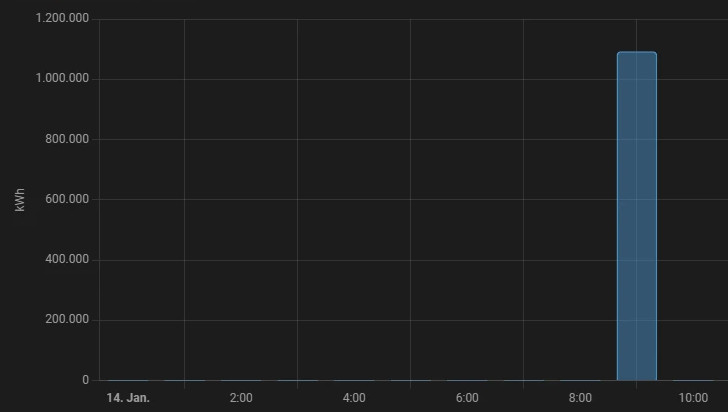
Originally, I had wrong values in the database every now and then when reading out the smart meter. I was able to correct the cause, but the wrong values do not look so good in the statistics. Only after I spent some time correcting the statistic data directly in the database, I discovered that wrong statistic values can be easily edited in Home-Assistant.
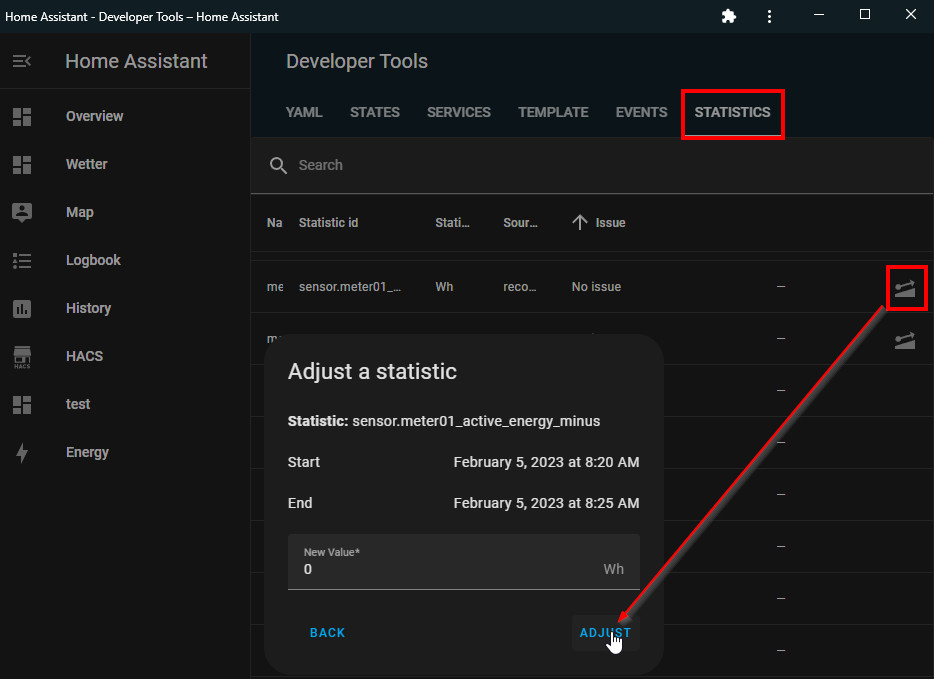
In the developer tools, in the tab "Statistics" the individual statistic values can be corrected:
Editing data from incorrect entries directly in the database
When integrating my water meter, I changed the unit from m³/h to liters and entered incorrect values in the database. There are several options for direct database access, for example SQLite Web or SQLite3 in VSCode, see: ha-sqlite.
Finding out the metadata_id
For the data in the "states" table, each entity has a metadata_id, which is stored in the states_meta table. The statistics tables use their own metadata_id, which can be found out as follows:
The value "statistic_id" is the name of the sensor in the "states_meta" table, the id is the metadata_id value in the statistics tables.
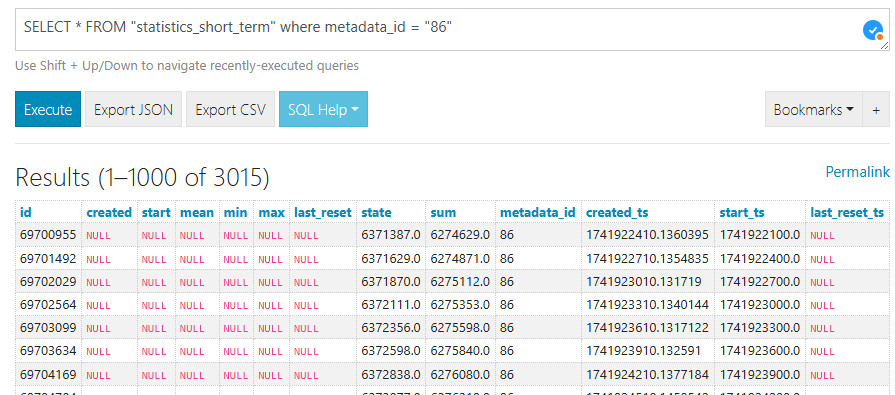
Display of all statistical data of a sensor using the metadata_id:
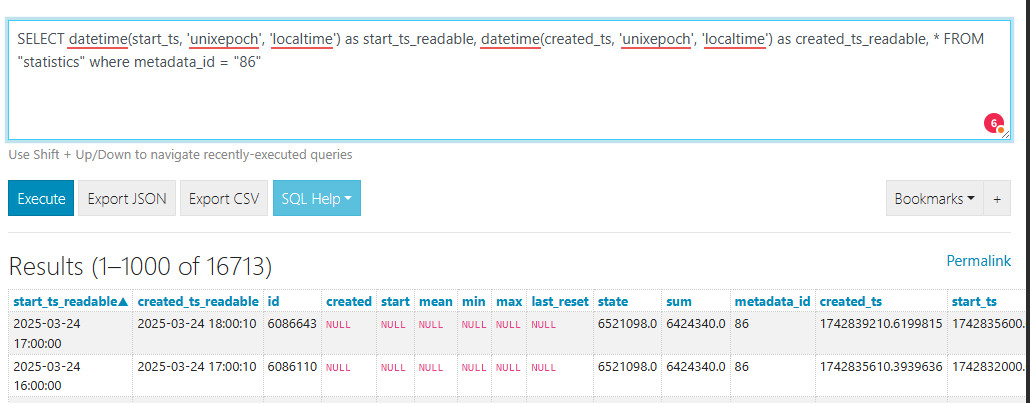
and so that created_ts and start_ts are also output as date and time, the query can be extended accordingly:
SELECT datetime(start_ts, 'unixepoch', 'localtime') as start_ts_readable, datetime(created_ts, 'unixepoch', 'localtime') as created_ts_readable, * FROM"statistics"where metadata_id = "86"
⚠
Attention, before an update statement is executed, Stop Home Assistant and create a backup of Home Assistant or the database file "home-assistant_v2.db"!
Update of a single value via query
update "statistics_short_term" set state="95197.0" where id=744412;
The update in SQLite can be done using the rowid, which makes the update statement a bit more involved compared to SQL.
The initial value can then be populated as follows:
update"statistics_short_term"SETSUM = "2058.0"whererowidIN (SELECTrowidFROM statistics_short_term
WHERE metadata_id = "86"LIMIT1);
The following query refills the remaining SUM values.
WITH t (id) AS (SELECTrowidFROM statistics_short_term
WHERESUMISNULLAND metadata_id = "86")
Update"statistics_short_term"SETSUM = (
(SELECTSUMFROM"statistics_short_term"where metadata_id = "86"andSUM != "null"ORDERBY"ID"DESCLIMIT1) +
(STATE - (SELECT state FROM"statistics_short_term"where metadata_id = "86"andSUM != "null"ORDERBY"ID"DESCLIMIT1))
)
whererowidIN (SELECTidFROM t)
Worst case: Reconstruct statistics data
After Home Assistant Recorder writes the details of the last 10 days into the database and these are handled by the history integration, the statistics data of the last 10 days can be reconstructed from the details. By deleting the history tables in the database, Home Assistant will refill them with the data of the last 10 days at the next start.
⚠
Attention, please be sure to backup the database before performing this action. When deleting the statistics tables, only the data from the last 10 days will be restored.
The last statistics data will now be rebuilt in the background:
The table "statistics_runs" shows the progress:
The data contains initially only 2 entries per day ...
Transfer statistics data from another database
It is also possible to migrate data from another database, for example from a backup to the current database. A dump can be created for existing tables as follows: sqlite
user@server:/var/web$ sqlite3
SQLite version 3.37.2 2022-01-06 13:25:41
Enter ".help"for usage hints.
Connected to a transient in-memory database.
Use ".open FILENAME" to reopen on a persistent database.
sqlite> .open /var/tmp/home-assistant_v2.db
sqlite> .output /var/tmp/export.sql
sqlite> .dump statistics
sqlite> .dump statistics_short_term
sqlite> .quit
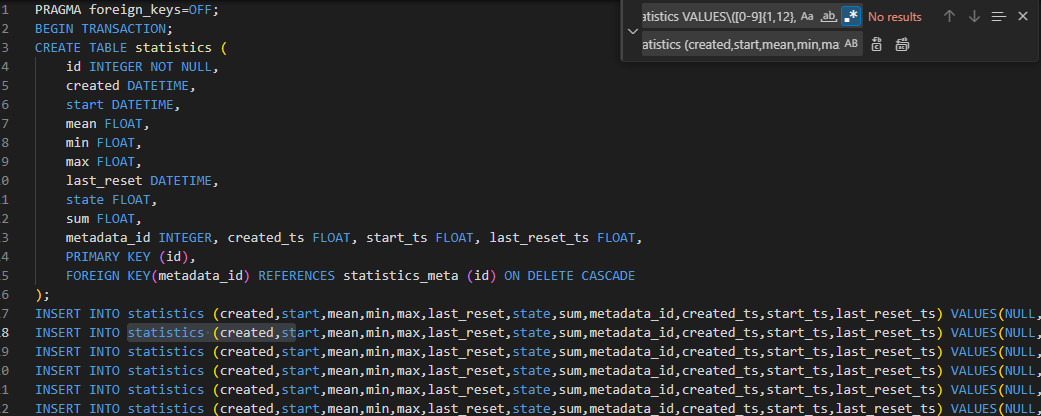
I have edited the dump with an editor so that it can be imported into another database. Mainly to remove the id from the dump and to add the columns for the insert:
The entries of the dump can then be imported into an existing database:
sqlite3
SQLite version 3.37.2 2022-01-06 13:25:41
Enter ".help"for usage hints.
Connected to a transient in-memory database.
Use ".open FILENAME" to reopen on a persistent database.
sqlite> .open /var/tmp/home-assistant_v2.db
sqlite> .read /var/tmp/export.sql
Transferring statistics from one device to another
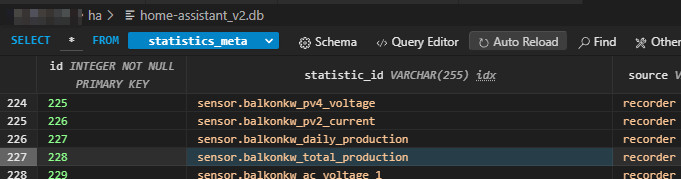
After replacing the inverter in my balcony power plant, I didn't want to lose the system's statistical data and wanted to continue using it with the new inverter. Only the ID of the sensor is used for mapping the statistics data:
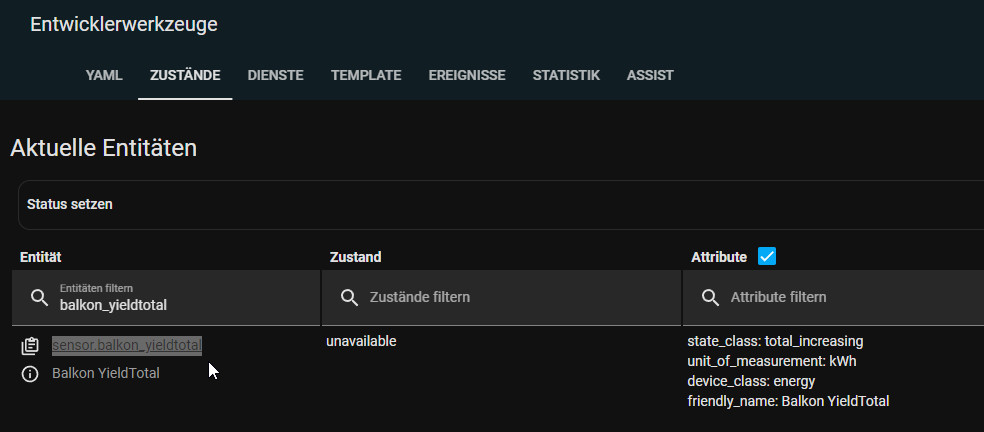
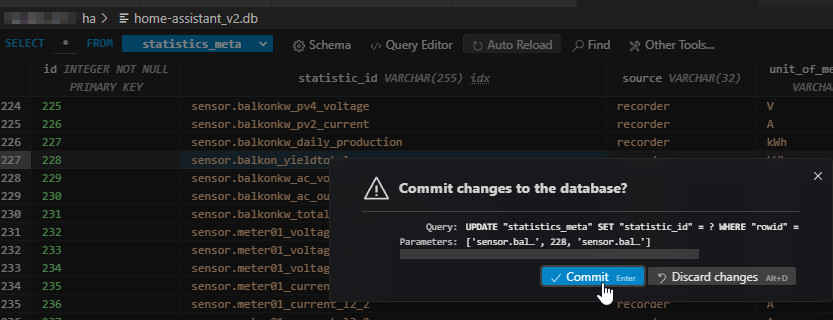
If statistic_id, here "sensor.balkonkw_total_production" is exchanged with another sensor name: in the following example sensor.balkon_yieldtotal, the statistical data can be transferred:
By renaming the statistic_id, all values of an existing sensor can be transferred to another one:
Als zweites Bespiel hatte die ursprüngliche Firmware-Version des Fronius Gen24-Wechselrichters ein Problem mit dem Zähler mit den Ladedaten für meinen BYD-Speicher.
Alternatively, the values of a sensor can also be deleted beforehand and recreated on the basis of another sensor
In the following example, I have deleted the statistical data of the entity: sensor.fronius_mppt_module_2_lifetime_energy and filled it with the statistical data of the sensor sensor.byd_total_charging.
Tabelle: statistics_meta:
Attention: Values in kWh ...
Attention: Values in Wh
Delete statistics for a specific sensor:
DELETEFROMstatisticsWHERE metadata_id = ( SELECTidFROM statistics_meta WHERE statistic_id = 'sensor.fronius_mppt_module_2_lifetime_energy');
Duplicate data from one existing sensor to another:
The following query duplicates all entries of the sensor sensor.byd_total_charging and creates them anew for the sensor sensor.fronius_mppt_module_2_lifetime_energy.
WITH target_sensor_statistics_meta_id AS (
SELECTidFROM statistics_meta WHERE statistic_id = 'sensor.fronius_mppt_module_2_lifetime_energy'
), source_sensor_statistics_meta_id AS (
SELECTidFROM statistics_meta WHERE statistic_id = 'sensor.byd_total_charging'
)
INSERTINTOstatistics (metadata_id, state, sum, created, start, mean, min, max, last_reset, created_ts, start_ts)
SELECT (SELECTidFROM target_sensor_statistics_meta_id), state * 1000, sum * 1000, created, start, mean, min, max, last_reset, created_ts, start_ts
FROMstatisticsWHERE metadata_id = (SELECTidFROM source_sensor_statistics_meta_id);
The sensor sensor.byd_total_charging is in kWh, sensor.fronius_mppt_module_2_lifetime_energy is in Wh. The query uses "state * 1000" and "sum *1000" to convert from kWh to Wh at the same time. If no conversion is necessary, simply remove *1000 for state and sum ...
Check:
The values can be checked with the following query:
Individual values can be changed very easily directly in Home-Assistant. The SQLite database used by Home-Assistant has some limitations compared to SQL or MySQL, but still the database can be accessed and edited directly. As an alternative to SQLite, Home-Assistant can also use MySQL as database, see: Home Assistant Database MySQL vs. SQLite.
Hi, I really enjoyed your post!
I have developed a python script around sqlite (with SQLAlchemy) to deal with this sort of changes; the idea is to export the sensor data into CSV, edit it with your favorite spreedsheet app, and import it back. This way I hope it would make it more accessible for people.
Do you mind taking a look at it? I'd really appreciate your feedback. https://github.com/naevtamarkus/homeassistant-statistics-cli
Thanks!








 ({{pro_count}})

Questions / Comments